
How to Request Remediation Testing
Remediation testing can be requested for an individual assessment once you have remediated the reported findings for an assessment.
To request remediation testing:
- Navigate to the Engagement and select the assessment you want to request remediation testing for. You can also navigate to the Assessments tab and select the assessment from the list.
- Click Actions in the top-right corner.
- Select Request Remediation Testing.
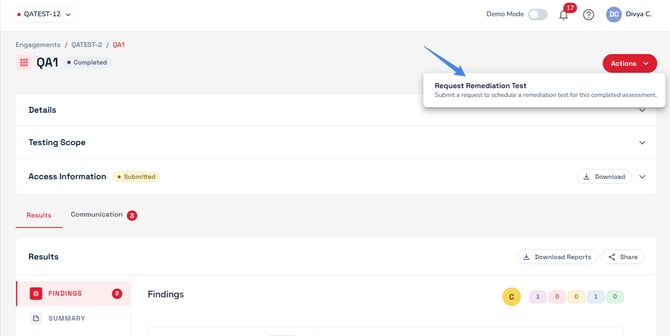
- Confirm your request and click Submit Request.
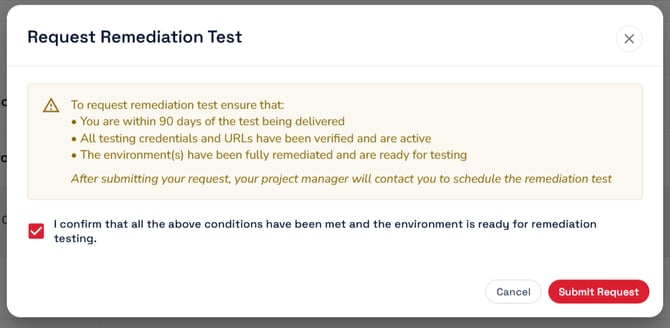
Once submitted, your request will notify the Project Manager (PM) assigned to the engagement. The PM will follow up with you regarding scheduling and any additional information or questions needed before remediation testing begins.
Before You Request Remediation Testing
Make sure the following requirements are met:
- The assessment was delivered within the past 90 days.
- All testing credentials and URLs have been verified and are active.
- All previously reported findings have been remediated in the testing environment and are ready for verification.
If Your Engagement Has Multiple Assessments
Remediation testing is requested per assessment. You do not need to wait until findings across the entire engagement have been remediated.
You can request remediation testing for each assessment as soon as its findings are ready for verification.
Additional Information
After submitting your request, you can use the Communication section of the engagement to provide additional information to the pentest team. For example, you can:
- Summarize which findings have been remediated.
- Note if any findings, such as low-priority findings, have not yet been addressed.
- Share any other information that may help the team prepare for remediation testing.
Important: Please ensure all reported findings have been remediated and the required testing credentials and URLs are active before submitting your request. This helps avoid delays in scheduling and completing remediation testing.